Welcome
A Scan/Repair Tool made easy.


About
Scan/Repair Command Prompt Tool


Incredible Tool helpful and easy to follow!
★★★★★
There is a number of PC Repair Optimizing Software in the market today, they all work in the same way but they are over priced & most are yearly Subscriptions
I decide to place one simple price & it's yours for life.
The Command Prompt Program can be used in 2 ways. You can Scan/Repair selection numbers in order e.g.
1. You type the numbers for windows issues in sequence starting with 1 follow by 2 - 3 - 4 - 5 etc. same for internet issues 40 - 49 until the issue is resolved.
2. If you understand the issue, you select the Scan/Repair Number that might fix the issue, if the issue not resolve you will select another Number: You continue the process until the issue has been resolved. The PDF Documentation provided will also guide you in explaining each selection if unsure.
Another factor is Fixado in some selection will open up a dialog box for example Device Manager & the documentation will guide you through the short step by step process to complete the task.
I have incorporated the best scan & repair commands to fix most of the Windows and internet issues that may occur & it is as simple as:
Select the number - Type the number - Press Enter.
The Command Prompt Program can be used in 2 ways.
You can Scan/Repair selection in order e.g.
1. You type the numbers for windows issues in sequence starting with:
1 follow by 2 - 3 - 4 - 5 etc. same for internet issues 40 - 49 until the issue is resolved.
2. If you understand the issue, you select the Scan/Repair Number that might fix the issue, if the issue not resolve you will select another Number: You continue the process until the issue has been resolved. The PDF Documentation provided will also guide you in explaining each selection if unsure.
Another factor is Fixado in some selection will open up a dialog box for example Device Manager & the documentation will guide you through the short step by step process to complete the task.
I have incorporated the best scan & repair commands to fix most of the Windows and internet issues that may occur & it is as simple as:
Select the number - Type the number -
Press Enter.



Documentation made easy for Rookies to become like the Experts
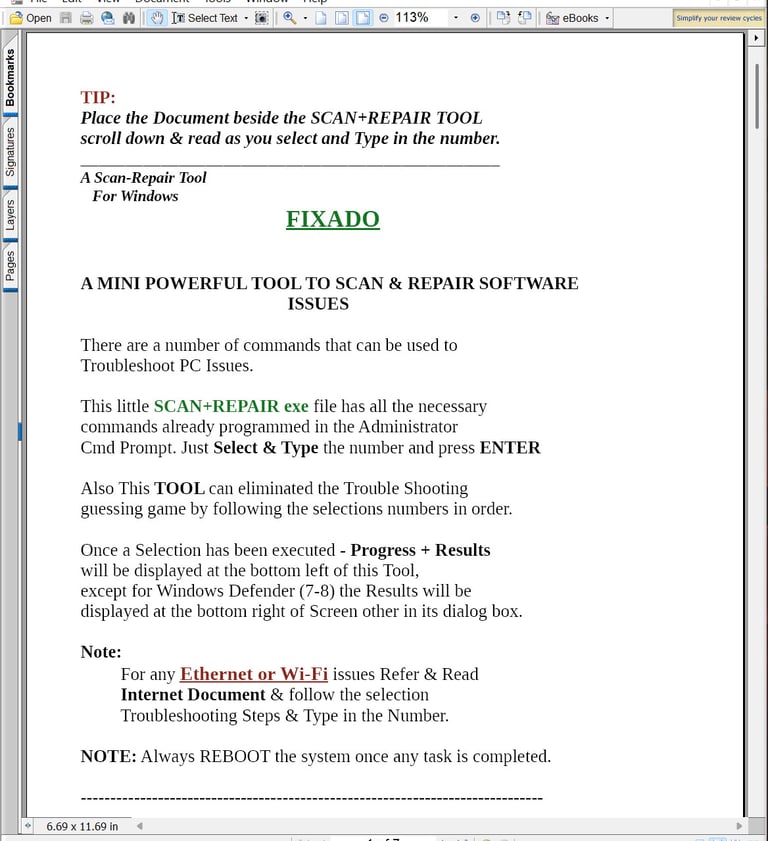
Documentation 1 - Windows PDF
Guidance info as you perform the selected Scan/Repair for the windows operating system
Documentation 2- Internet PDF
Guidance info as you perform the selected Scan/Repair for most common Internet Issues
REVIEWS


”Fixado is so easy to use i was able to resolve my disappearing taskbar issue" No longer frustrated
Thanks Fixado
- Tom Turner






”My problem was i could connect to the internet using wi-fi but i could not access any sites through my Chrome Browser i followed 3 steps in Fixado and solved my issue.”
- Lisa May
★★★★★
★★★★★
★★★★★
★★★★★


”I am always travelling & constantly using my laptop to run my online business i use Fixado to maintain
my PC to prevent any nasties
happening.”
- Steve Shaffron
★★★★★
”Fixado helped me resolve my internet issue quickly and easily I can't go without watching my
favourite Youtube Videos ”
- Marianna Sevastis
★★★★★
”I had a problem with my laptop sometimes not booting up i used one of the selection in Fixado & it fixed the problem, very impressed"
- Brian Button
”I hate it when my laptop is slow in generally running when i am trying to access my emails, using my social media apps & watching Youtube. After i selected 5 numbers in Fixado my laptop is now running well not as slow as before"
- Sharon Glee